
CI/CD Setup
Manual deployments don't stay manual for long before something gets skipped — a test, a config change, a rollback step. We build CI/CD pipelines that make shipping code routine and boring, in the best way.
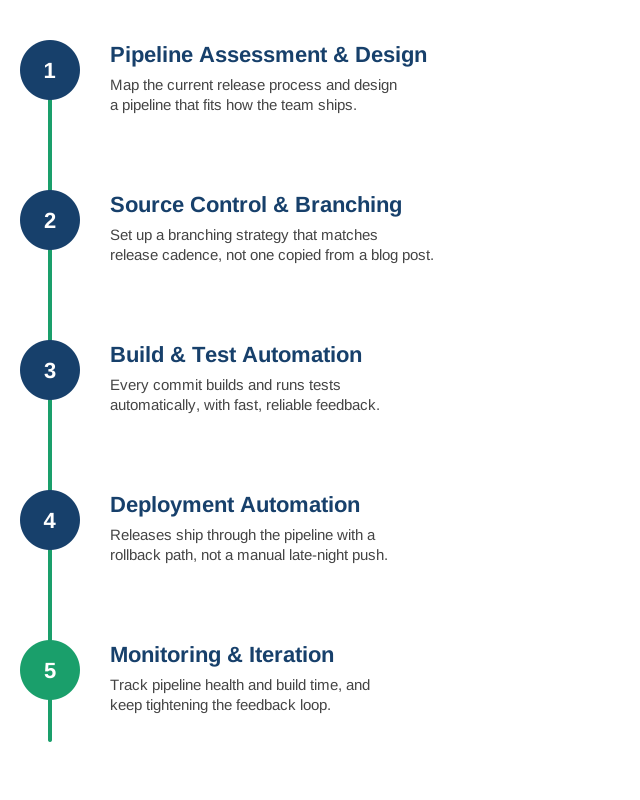
1. Pipeline Assessment and Design
We start by mapping how code actually gets released today — where the manual steps and bottlenecks are — and design a pipeline around your stack and team, not a generic template.
- Current-state mapping: every manual step between "code written" and "code running in production," including the ones nobody's written down.
- Bottleneck identification: the slowest or most error-prone step is usually where a pipeline pays off fastest.
- Tool fit: GitHub Actions, GitLab CI, Jenkins, or something else — chosen for where your code already lives, not a preference for a specific brand.
- Stage design: build, test, and deploy stages laid out to match how your application actually needs to ship.
2. Source Control and Branching Strategy
A branching model (trunk-based, GitFlow, or something simpler) chosen to match your release cadence and team size, not copied wholesale from a blog post.
- Trunk-based development: short-lived branches merged frequently, a good fit for teams shipping continuously.
- GitFlow or release branches: a better fit when releases are versioned and less frequent, with room for hotfixes against older versions.
- Branch protection rules: required reviews and passing checks before merge, enforced by the platform, not by convention.
- Commit and PR conventions: consistent enough to support automation like changelogs and semantic versioning, without becoming bureaucratic.
3. Build and Test Automation
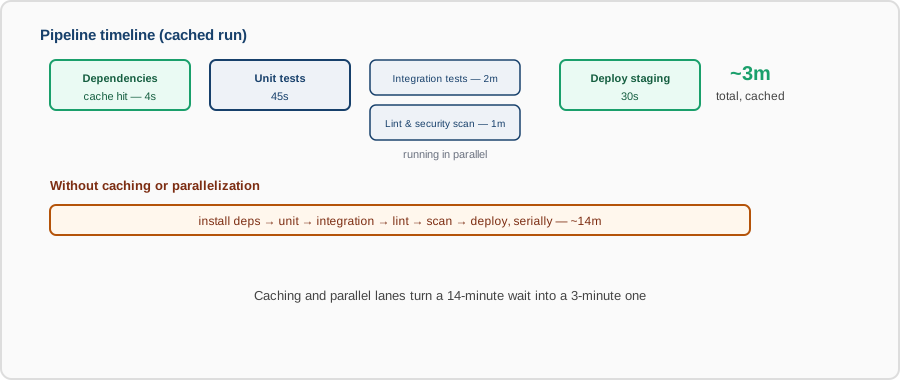
Every commit triggers a build and test run automatically, with fast, reliable feedback — a test suite that takes 40 minutes or flakes half the time trains people to ignore it.
- Fast feedback loops: the most common tests run first and fast, so a broken build is caught in minutes, not after a long full suite.
- Flaky test elimination: tests that fail intermittently are fixed or removed — a red build people learn to ignore is worse than no test at all.
- Build caching: dependencies and build artifacts cached between runs so pipelines aren't redoing the same work every time.
- Parallelization: independent test suites run concurrently instead of one long serial chain.
4. Deployment Automation
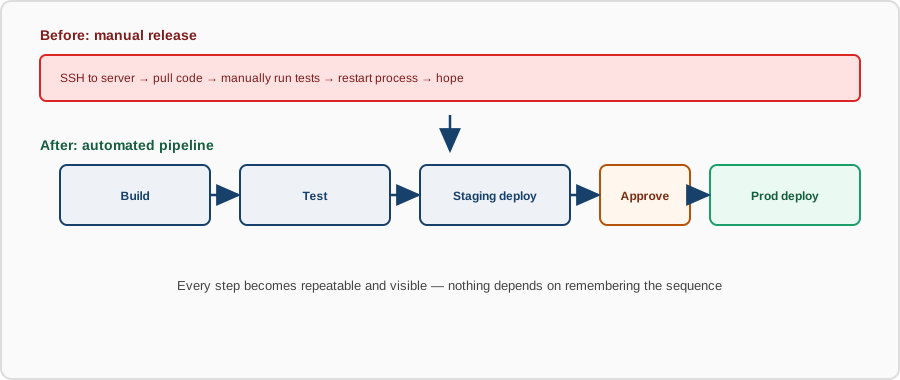
Releases move through the pipeline to staging and production with a defined approval and rollback path, replacing manual, late-night deploys.
- Progressive rollout: canary or rolling deployments that catch a bad release on a fraction of traffic, not all of it at once.
- Approval gates: production deploys require an explicit sign-off where that matters, automatic where it doesn't.
- One-click rollback: reverting a bad deploy is as automated as shipping one, not a manual scramble.
- Deployment visibility: everyone can see what's deployed where, and when, without asking in chat.
5. Pipeline Monitoring and Iteration
We track build times, failure rates, and deployment frequency, and keep tightening the pipeline as the codebase and team grow.
- Pipeline metrics: build duration, failure rate, and deployment frequency tracked over time, not just glanced at when something breaks.
- DORA metrics: lead time, deployment frequency, change failure rate, and recovery time — the standard measures of how well the pipeline is actually working.
- Regular review: pipeline performance revisited periodically, not left untouched since the day it was set up.
- Continuous refinement: as the codebase and team grow, the pipeline is adjusted rather than becoming the bottleneck it was built to remove.
Contact us to set up CI/CD from scratch, or to fix a pipeline that's become more trouble than it's worth.