
Licensing Check
Back to Cloud Infrastructure Consulting · Dependency Mapping · Service Offerings
A licensing check establishes which software in scope is licensed per-core or tied to specific hardware, because either can change the economics of a move entirely. It is the second step of a cloud readiness assessment, and it belongs next to dependency mapping: one tells you what a workload is connected to, the other tells you what it is contractually attached to.
The reason this is a separate exercise is that licensing is the one migration cost that is not visible in any technical inventory. CPU, memory, storage and bandwidth all have obvious meters. A licence has a contract, and the contract may say that the same workload — identical software, identical throughput, identical users — is a different number of licensable units after it moves. Businesses discover this after the migration case has been approved, which is the expensive order to discover it in.
1. The Four Questions
For every licensed product in scope, four questions decide whether licensing is a footnote or a blocker.
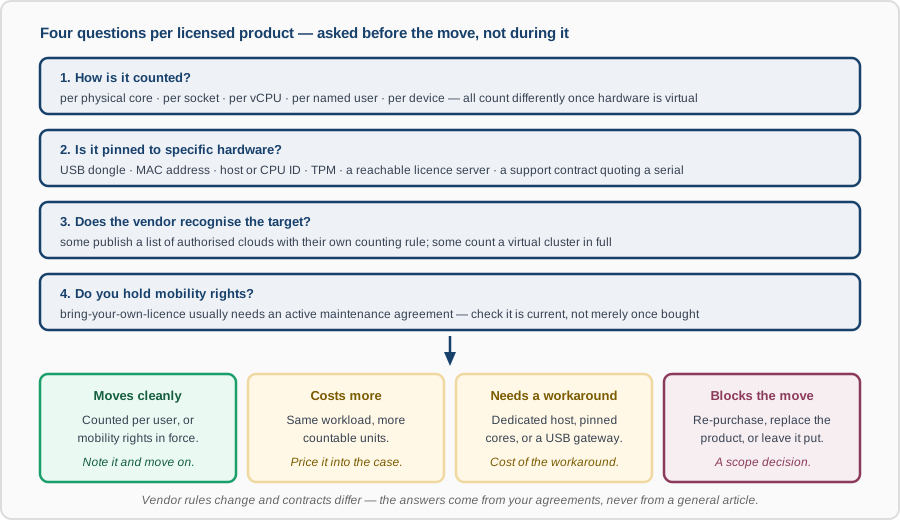
The outcome we are looking for per product is one of four: it moves cleanly, it costs more, it needs a technical workaround, or it blocks the move and becomes a scope decision. Knowing which before the business case is signed is the entire point.
2. How the Counting Changes
On physical hardware, per-core products are usually counted against the cores you own. Once the hardware is virtual, the vendor decides what a “core” is, and that decision is not always in your favour.
- Physical cores become vCPUs. A vCPU is typically a hyperthread, not a core, so vendors publish their own conversion — commonly two vCPUs per licensable processor when hyperthreading is on. The conversion is the vendor's, not yours.
- Discount factors may not survive the move. Some vendors apply a multiplier to physical cores that reduces the count on certain CPU families, and explicitly do not apply it to their cloud counting rules. Losing that multiplier can double the licence count without a single extra core of real capacity.
- Minimums appear. Several products set a floor per virtual machine — a minimum number of licensable cores regardless of how small you size the VM. Right-sizing below the floor saves compute and saves nothing on licences.
- Virtualisation can widen the boundary. The trap that has produced the largest bills: some vendors do not accept a hypervisor's CPU limits as a licensing boundary, and take the position that the licensable unit is every host the workload could be scheduled onto. A two-vCPU database on a large cluster is then licensed against the cluster.
- The same logic reaches Kubernetes. Where a licence follows the node, any node a pod may land on is a candidate. Node affinity and taints stop being a scheduling preference and become a licensing control — see containerization and Kubernetes.
3. What Pins a Licence to Hardware
“Tied to specific hardware” covers several mechanisms, and they fail in different ways when the hardware goes away.
- USB dongles. Common in engineering, CAD, broadcast and manufacturing software. A cloud VM has no USB port. The workaround is a USB-over-IP gateway on a machine that stays put, which is possible, adds a dependency and a latency path, and is sometimes prohibited by the licence terms themselves — worth reading before you build it.
- MAC address, host ID or CPU ID locks. Licence files generated against a machine fingerprint. Some can be re-hosted on request, some a fixed number of times, and some not at all. Re-hosting usually requires an open support contract.
- TPM or secure-enclave binding. Harder to move than a MAC lock, and often impossible without vendor involvement.
- Licence servers. The software is not locked, but it must reach a licence server to start. This is a genuine dependency and belongs on the dependency map — and it dictates migration order, because the licence server has to move first or stay reachable across the transition.
- Support contracts quoting a serial number. The software may move fine while the support does not, because the entitlement was sold against a chassis that is being decommissioned. This one is easy to miss precisely because the software keeps working.
4. Where the Economics Actually Turn
A licensing check is worth doing even when nothing is blocked, because it frequently changes the shape of the migration rather than only its price.
- Bring your own, or rent it. Most clouds offer the same product either as a pay-as-you-go instance with the licence in the hourly rate, or as bring-your-own-licence. Hourly tends to win for small or intermittent workloads and lose badly at steady scale; the crossover is arithmetic, and it is worth doing per workload rather than once for the estate.
- Mobility rights usually have a condition. Bringing an owned licence to a third-party cloud is commonly permitted only while a maintenance or assurance agreement is active. A licence bought outright years ago may have lapsed out of its own portability.
- Dedicated hosts change the sum. Where a vendor only accepts bring-your-own on dedicated hardware, the comparison is no longer licence versus licence — it is the licence plus a dedicated host against a pay-as-you-go rate on shared infrastructure.
- Standby nodes may need licensing too. A warm secondary is running software. Some vendors grant a free passive replica under conditions, some allow a limited number of failover days per year, and some simply count it. This can quietly dominate the cost of a disaster recovery design, and it is a reason to settle licensing before architecture rather than after.
- The cheapest finding is usually something to switch off. Licensed products nobody uses, editions more expensive than the features in use require, and per-user licences for people who have left. This routinely pays for the assessment before the migration starts.
- Migrations attract audits. A large change in deployment is a visible event. Having an accurate, dated position before anyone asks is a materially better place to negotiate from than assembling it under a deadline.
5. How We Run It
- Inventory what is installed — not what was purchased. These differ in both directions, and the gap is the finding.
- Pull the entitlements — contracts, order forms, maintenance renewals and the current terms each one points at. Editions and versions matter; so does the date.
- Reconcile the two and record, per product, how it is counted, what it is pinned to, and what your rights actually are today.
- Model the target — the licence count after the move under each candidate shape, including the workarounds and their costs.
- Feed it back into the plan — because the answer sometimes changes the destination, the instance shape, or whether a workload should move at all.
A necessary caveat. Everything above describes the shapes these rules take, deliberately without naming vendors' current numbers. Licensing terms change, they differ between editions and regions, and your negotiated agreement may not match the public policy at all. Several vendors' cloud counting rules are published as policy documents rather than contract terms, which means they can be revised. We work from your agreements, and for a position you intend to defend in an audit or a negotiation, a licensing specialist or your legal counsel should confirm it. This page is not legal advice.
What You Get
- A per-product register: how it is counted, what it is pinned to, entitlements held, and whether maintenance is current.
- The licence position today versus the modelled position after the move, per candidate target.
- Blockers and workarounds costed, so “it can be done” carries a number.
- Retirement and downgrade candidates — the part that usually pays for the work.
- Whatever needs to go into the migration plan: ordering constraints, instance shapes, and anything that has to stay put.
Talk to us before the migration business case is finalised, not after. Licensing is the cost most often left out of it, and the one least amenable to being fixed later.