
Scalability Path
Back to Server Setup · Growth Projections · High Availability · Service Offerings
The last step of server selection: confirming the chosen setup can scale vertically or horizontally later without a full re-architecture. It is a check rather than a build, it takes an afternoon, and it is the difference between growth being a purchase order and growth being a project.
Note what it is not. Growth projections ask how much bigger things will get and when. This asks a different question: when that happens, what do we actually do — and is the answer available without rewriting anything?
1. Scaling Up: Simple, and It Ends
Vertical scaling means a bigger machine. It is much the easier option because nothing about the application has to change, and the work is limited to a maintenance window. Its defining property is a hard ceiling, and the exercise is to know where that ceiling is before you need it:
- On owned hardware — how many memory slots are free and what the maximum supported module size is; whether the chassis takes more disks; whether the processor can be replaced with a larger one on the same socket; whether the power supply supports it. A server bought fully populated has no vertical path at all, which is worth knowing at purchase rather than in year three.
- On rented capacity — the largest instance in the family, whether resizing is a reboot or a rebuild, and whether the larger sizes exist in your region.
- In both cases — whether the software benefits. Doubling the cores of a single-threaded workload changes nothing, and a database with a memory-resident working set stops improving once it fits.
Write the ceiling down as a number. “This design runs out at about four times today's load” is a useful sentence; “we can always get a bigger server” is not.
2. Scaling Out: No Ceiling, One Precondition
Horizontal scaling has no equivalent ceiling, and a precondition that cannot be satisfied on the day you need it. Whether the application tolerates running as more than one copy is a property of the software, and retrofitting it is development work, not infrastructure work.
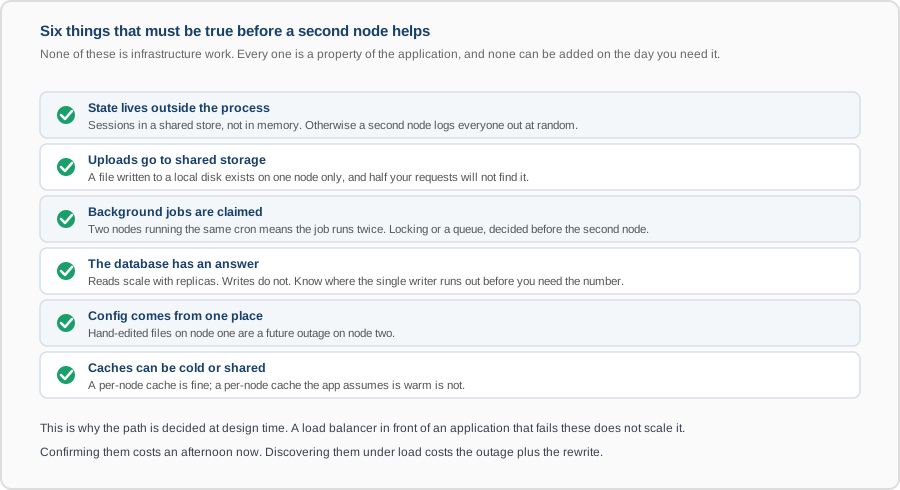
Each of these has a characteristic failure that is worse than not scaling at all, because the system appears to work. Sessions in process memory mean users are logged out at random. Uploads on a local disk mean files that exist for half the requests. An unclaimed cron job runs twice, which for an invoice run or a payment retry is a serious outcome.
The database is the precondition that usually decides how far horizontal scaling goes. Read replicas are straightforward and help read-heavy systems immediately. Writes go to one primary, and scaling past that means partitioning or a different database — a substantial project. So the useful figure is the write capacity of the primary, known in advance.
3. The Third Option: Split It Up
Where neither up nor out works for the whole system, the remaining move is to separate the components so they scale independently — putting the database on its own machine, moving background workers off the web servers, giving the reporting workload its own replica. This is often the cheapest real answer, because it targets the one component that is actually constrained instead of duplicating everything around it. It also usually removes the worst-behaved neighbour from the busiest machine, which helps before any capacity is added.
4. When the Architecture Itself Has to Change
Being honest about this is part of the check. Some paths run out, and the signals are recognisable:
- The write volume exceeds what one primary database can take.
- A single request fans out to so many internal calls that latency is dominated by the network rather than by work.
- One component's requirements have diverged so far from the rest that sizing for both is wasteful.
- The deployment unit has become large enough that any change carries whole-system risk.
The value of naming these now is that the re-architecture becomes a planned piece of work with a trigger attached, rather than an emergency. It belongs in the trigger list from growth projections, with realistic lead time — because this kind of change is measured in months.
5. What This Changes Today
Often very little, and that is the intended outcome. Sometimes it changes small things at no cost: buying a chassis with free memory slots rather than a fully populated one, putting sessions in a shared store from the start, writing uploads to object storage rather than to a local path, keeping configuration in one place. Each is nearly free at build time and expensive later, and doing them now is what architecture design is for.
What You Get
- The vertical ceiling as a number — the multiple of today's load at which a bigger machine stops being available or stops helping.
- A precondition check for horizontal scaling, with any gaps named as specific work rather than as a general concern.
- The database write ceiling, stated.
- The cheap changes worth making now so that later options stay open.
- The point at which the architecture has to change, with a trigger attached and an honest lead time.