
Budget and Constraints
Back to Server Setup · Growth Projections · Licensing Check · Service Offerings
This stage settles upfront hardware costs versus ongoing cloud spend, and any existing vendor or licensing commitments to work around. It is the last stage of the server setup assessment, and it is deliberately last: it is only answerable once the workload, the existing estate, the growth outlook and the compliance requirements are known.
It is also the stage where the honest answer is most often different from the fashionable one. Neither owning nor renting is generally cheaper. Which one wins depends on how steady the load is, how long the equipment will last, and what you have already signed — and the comparison is routinely made on numbers that leave out half of each column.
1. Compare Totals, Not Sticker Prices
The quote for a server and the monthly price of an instance are not comparable figures. What belongs in each column:
| Owning — usually left out | Renting — usually left out |
|---|---|
| Rack space, power and cooling | Egress charges, which scale with use |
| Hypervisor and management licences | Snapshots, backups and their retention |
| Spares, and a support contract | The support plan, often a percentage of spend |
| Someone's hands, on site, sometimes at night | Resources nobody switched off |
| Replacement at the end of its life | Growth — the bill rises with the business |
| The cost of the capital being tied up | Price changes, which are the provider's to make |
Put both over the same period — the realistic life of the hardware, typically four or five years — and the comparison becomes a chart with a crossing point rather than an argument.
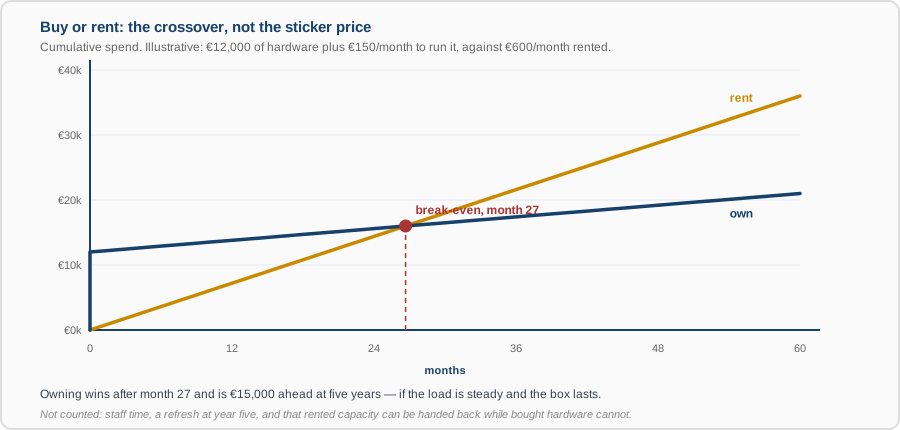
The numbers above are illustrative, and the shape is the point rather than the values. Owning is a step followed by a shallow slope; renting is a straight line from zero. They cross, and where they cross is the decision. If the crossover is beyond the useful life of the hardware, renting wins outright. If it arrives in year two of a five-year need, owning does — provided the load is steady enough to keep the machine busy.
2. What Actually Tips It
- How steady the load is. This is the real discriminator. Owned capacity is paid for whether used or not, so a flat, predictable workload suits it and a workload that is busy two days a month does not.
- How certain the requirement is. Renting buys the option to be wrong. For something new, where the growth projection is genuinely a guess, that option has real value — and it disappears the moment you sign for hardware.
- Whether it can be switched off. Development and test systems that run office hours only cost roughly a quarter of what they do running continuously. Nothing equivalent is available for a machine you own.
- The hybrid, which is usually the right answer. Own the steady baseline, rent the peak and the uncertain parts. Most estates that have thought about this end up here rather than at either extreme.
- Commitment discounts. One- and three-year commitments cut cloud rates substantially, and they are a bet on your own forecast: commit too much and you pay for capacity you do not use, which can be worse than not committing at all. Commit the baseline you are confident of, and leave the rest on demand.
3. Constraints That Are Not Money
These decide outcomes as often as the arithmetic does, and they are easier to miss because they do not appear in a spreadsheet.
- Capex and opex are different pots. An organisation with capital budget available and no room in operating expenditure will buy hardware even where renting is marginally cheaper — and that is a legitimate constraint, not a mistake to argue with. Knowing which pot the money is in changes the recommendation.
- Cash flow. A business that cannot comfortably part with the upfront sum should not, whatever the five-year total says.
- Procurement lead time. An instance exists in seconds; a server is quoted, approved, ordered, built and delivered — weeks, and sometimes months for anything specialised. If the deadline is in six weeks, that may settle the question by itself.
- Approval cycles. A purchase above a threshold may need a board meeting that happens quarterly.
- Where you are allowed to put it. Residency and sovereignty requirements from compliance can remove options before cost is considered.
- The skills you have. Running your own hardware needs people who can; a managed platform costs more per unit and less in attention. Which is cheaper depends on what your team's time is worth and what else it could be doing.
4. The Commitments You Already Have
Most organisations are less free than they assume, and finding this out after a decision is worse than before it:
- Hardware support contracts with time left on them — usually non-refundable, and a real cost of retiring the equipment early.
- Colocation or data-centre agreements with a notice period, sometimes a year, which means paying for space you have vacated.
- Software licences with a term, and licences whose portability depends on active maintenance — the subject of the licensing check, and frequently the single largest constraint on where a workload can go.
- Minimum spend commitments already signed with a provider. Moving work away does not reduce the bill if you have committed to a floor.
- Depreciation. Equipment still being written down has book value, and disposing of it early has an accounting consequence your finance team will care about even when the technical case is clear.
None of these necessarily blocks anything. They change the arithmetic, and they are much cheaper to discover now.
5. How We Present It
Not a recommendation with a number attached, but the comparison itself: two or three costed options over the same period, each with its assumptions written down, the crossover point, and the non-financial constraints that apply to it. Where we have a preference we say so and say why. The decision involves cash flow, risk appetite and budget structure that are yours rather than ours, so the deliverable is one you can take to a finance function and defend.
What You Get
- A total-cost comparison over the asset's realistic life, with both columns complete and every assumption stated and challengeable.
- The break-even point, and what would have to change to move it.
- A register of existing commitments, with end dates and exit costs.
- The non-financial constraints — lead times, approval cycles, budget structure, skills — recorded as inputs rather than discovered later.
- A recommendation, usually including the hybrid option, with the conditions under which it stops being the right one.
This closes the assessment. The output is a written recommendation covering architecture, estimated costs and a rollout timeline — which is what you sign off before any work begins. Back to server setup.