
Current Infrastructure Audit
Back to Server Setup · Workload Requirements · Dependency Mapping · Service Offerings
An infrastructure audit establishes what hardware, virtual machines, cloud resources and software you actually have, and which of it is outdated or underused. It is the second stage of a server setup, and it runs alongside workload requirements: one says what the work needs, the other says what you are already paying for.
Almost every organisation already has an inventory. The audit exists because the inventory is wrong — not through negligence, but because infrastructure is added under deadline and removed never. The output that matters is not the list. It is the difference between the list and reality, which is where both the risks and the savings live.
1. What Gets Counted
- Physical hardware — make, model, age, serial, specification, and the three things usually missing: whether it is still under warranty, whether the vendor still sells parts for it, and what firmware it is running. A server whose BIOS has not been touched in six years is carrying every firmware vulnerability published since.
- Virtual machines — hypervisor and version, guest operating systems, and crucially allocated versus actually used CPU, memory and disk. The gap between those two numbers is the single most reliable source of savings in most estates.
- Cloud resources — every account and subscription, including the ones outside central IT, across every region. Instances, storage, databases, load balancers, and the long tail nobody looks at: unattached volumes, forgotten snapshots, reserved addresses pointing at nothing, old machine images, log groups retaining data forever.
- Software — what is installed and at which version, against what was purchased, and where each version sits in its support lifecycle. This is also the input to the licensing check.
- The supporting layer — network devices, certificates and their expiry dates, DNS zones, backup jobs and when each last succeeded, and monitoring coverage, which tends to have gaps exactly where nobody is looking.
- Ownership. For each asset, a named owner and a reason it exists. Anything without both is a finding in its own right.
2. How We Find It
The same discipline as dependency mapping: several sources, each with a different blind spot, reconciled against one another.
- Ask the platforms directly. Hypervisor and cloud provider APIs are authoritative about what exists and free to query. Start here.
- Read the bill. The cloud invoice is the most honest inventory in the organisation, because nothing bills without existing. It is also the fastest route to resources nobody remembers creating.
- Query the hosts. Package managers, installed-software lists, and running services — through your configuration management tool where one exists, or over SSH where it does not.
- Scan the network, because this is the only method that finds the machine nobody documented. Under-desk servers, a test box that became production, an appliance from a supplier who is no longer engaged.
- Look at procurement and the expenses. Card-paid SaaS and cloud accounts do not appear in any technical scan. They appear in the accounts.
Where an agent is unwelcome — appliances, vendor-managed systems, anything under a support contract — agentless discovery gets the same information without touching the machine.
3. “Outdated” Has Three Different Dates
This distinction is worth being precise about, because organisations regularly believe they are covered when they are not:
- End of sale — you can no longer buy it. Harmless on its own.
- End of support — no more feature updates, and often no more routine bug fixes. Vendor help may still exist, and may cost extra.
- End of security updates — the one that matters. From this date every newly published vulnerability in that product stays open permanently. Some vendors sell extended security updates beyond it; that is a purchase decision with a price, not a state of being supported.
The audit records all three dates per product, plus hardware warranty expiry, and flags anything already past a date or passing one inside the planning horizon. That list is a risk register, and it is what turns “we should upgrade sometime” into a sequence with deadlines — which then feeds patch management.
4. “Underused” Is Where the Money Is
- Oversized machines. A VM allocated eight cores and using half of one. This is normal, not exceptional, because sizing was a guess made once and never revisited.
- Orphans. Disks not attached to anything, snapshots of servers that no longer exist, idle load balancers, addresses reserved for a project that ended. They bill monthly, silently, indefinitely.
- Environments that never sleep. Development and test systems running at full price at 03:00 on a Sunday. Scheduling them off outside working hours is often the largest single saving available and takes an afternoon.
- Duplicate tooling — two monitoring systems, three ways of shipping logs, a CI system nobody migrated off. Each has a licence and someone maintaining it.
- Retention nobody chose. Logs and backups kept forever because no policy was ever set. Storage is cheap per gigabyte and expensive per year.
The counterpart matters too: the audit also flags anything running hot. A host at 90% at peak is not efficient, it is about to become slow — for the reasons set out under workload requirements.
5. The Disposition
Every asset is placed against two axes — how heavily it is used, and where it sits in its supported life — which gives four boxes and one action each.
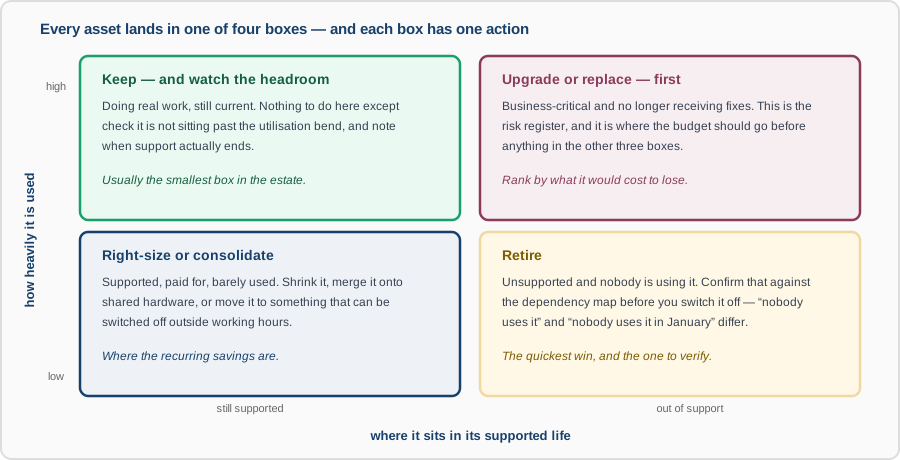
One caution on the retire box. “Nobody uses it” is a claim about the window you observed. A system idle all week may be the quarter-end reconciliation, and switching it off is discovered in three months. Confirm against the dependency map and a long enough log history first — and where there is doubt, power it down and leave it recoverable for a cycle rather than deleting it.
What You Get
- A reconciled asset register across hardware, virtual machines, cloud and software, with an owner and a stated purpose against each line — and the unowned ones listed separately.
- A lifecycle report: end-of-support and end-of-security dates, warranty expiry, and what lapses within the planning horizon.
- A utilisation report showing allocated against used, with right-sizing and consolidation candidates quantified in money per month.
- The orphan list — resources that exist, bill, and serve nothing.
- A disposition per asset (keep, right-size, upgrade, retire) ordered by risk and by saving, so it can be worked through rather than admired.
- The collection scripts, so the audit can be re-run in a year without repeating the work.
An audit is bounded work with an unusually direct payback: the retirements and right-sizing frequently cover its cost, and the lifecycle findings are the ones you would rather not discover during an incident. It feeds directly into architecture design and into capacity planning.