
Data Gravity
Back to Cloud Infrastructure Consulting · Dependency Mapping · Licensing Check · Service Offerings
Data gravity is the observation that large datasets attract the services that use them, and resist being moved. Where your largest datasets already live shapes what a migration can realistically look like, because moving compute away from data can be more expensive than leaving both in place. The term was coined by Dave McCrory in 2010, and the analogy is apt: mass attracts, and the bigger the mass the harder it is to shift.
This is the third step of a cloud readiness assessment, alongside dependency mapping and the licensing check. Unlike those two, it is mostly arithmetic — which is what makes it so useful early. You can settle a great deal of a migration plan with a transfer-rate calculation and a price list, before anyone touches a server.
1. Why Data Resists Moving
- Transfer takes real time. Not an inconvenience — sometimes a constraint that eliminates an option outright. See the table below.
- Leaving costs money, arriving is free. Cloud providers have conventionally charged for data leaving and not for data arriving. That asymmetry is not accidental: it is what makes data gravity a commercial force and not only a physical one.
- The dataset grows while you copy it. If daily growth approaches your daily transfer rate, you never converge. This is the calculation people skip, and it is the one that turns a planned weekend into an open-ended project.
- Distance costs latency, and chatty code pays it repeatedly. An application issuing a few hundred queries per page is fine at 0.2 ms and unusable at 20 ms. Separating compute from its database does not break anything visibly — it just makes everything slow, which is harder to diagnose and harder to reverse.
- Other things attach themselves. Reporting, analytics, backups, an ETL job, someone's dashboard. Each new consumer makes the dataset harder to move than it was last year. Gravity compounds.
- Sometimes the law decides. Residency and sovereignty requirements can fix where data is allowed to sit regardless of the economics, and then compute placement follows from that rather than the other way round.
2. The Arithmetic, First
Before any discussion of strategy, work out how long the first full copy takes. The numbers below assume 70% of line rate sustained, which is optimistic for a shared link and realistic for a dedicated one:
| Dataset | 100 Mbit/s | 1 Gbit/s | 10 Gbit/s |
|---|---|---|---|
| 1 TB | 1.3 days | 3.2 hours | 19 minutes |
| 10 TB | 13.2 days | 1.3 days | 3.2 hours |
| 100 TB | 132 days | 13.2 days | 1.3 days |
Three things follow immediately. Above roughly 10 TB on anything short of a 10 Gbit/s link, a physical transfer appliance — every major provider ships one — stops being exotic and starts being the obvious answer. Second, if the copy takes 13 days, you need incremental sync plus a final delta at cutover, not a copy; plan it that way from the start. Third, compare the daily growth rate against the daily transfer rate before anything else, because if growth wins, no amount of patience closes the gap.
Then price the exit. Egress is charged per GB and the per-GB figure looks small until it is multiplied by a dataset — and note that a one-off migration charge is a very different thing from an ongoing charge for an application that reads across the boundary every day. The second is the one that quietly outgrows the saving that justified the move. Worth knowing when you plan: EU rules adopted in the Data Act have been progressively removing switching charges for customers leaving a cloud provider, and several providers have already waived egress fees for a full exit. That changes the one-off number considerably; it does not change the day-to-day cost of an application that lives apart from its data.
3. The Four Responses
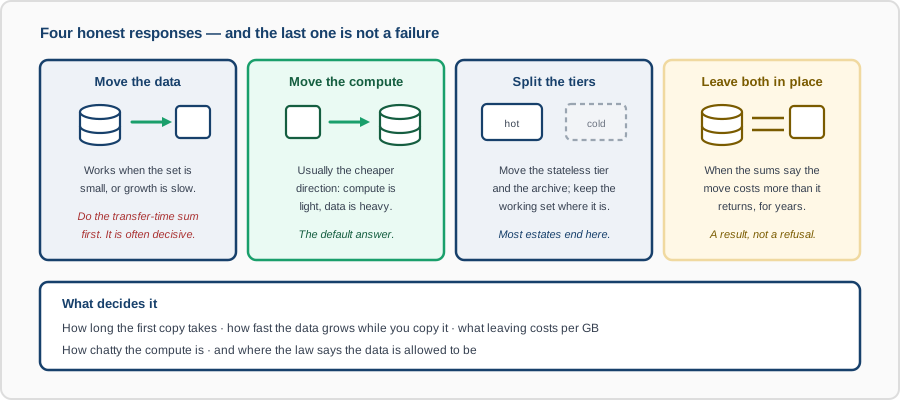
- Move the data to the compute. Clean when the set is small or slow-growing. The transfer-time sum decides, and it decides more often than people expect.
- Move the compute to the data. Usually the cheaper direction, because compute is light and data is heavy. If the dataset must stay where it is, put the processing next to it — including, sometimes, in a provider you would not otherwise have chosen.
- Split the tiers. The most common real outcome. The stateless application tier and the cold archive move; the hot working set stays put until there is a reason to move it. This requires knowing which data is actually hot, which is measurement rather than opinion.
- Leave both in place. A legitimate result. If the numbers say the move costs more than it returns for the next several years, the honest recommendation is not to do it — and a well-run server that stays where it is remains a perfectly good outcome.
4. A Small Worked Example
An illustration from our own infrastructure, because the shape is clearer at small scale. One of our hosts holds about 457 GB and sits behind an uplink that sustains roughly 0.4 MB/s. At that rate:
- 130 MB of application state — about 5 minutes.
- 16 GB of container images — about 11 hours.
- The full 457 GB — about 13 days.
That single arithmetic result determined the design of our disaster recovery setup. Replicating everything nightly was never available; the images are rebuilt at the standby from source rather than shipped, and only the application state crosses the link. Nothing about that decision required a meeting — the link speed made it. The same reasoning at 457 TB and 10 Gbit/s produces the same three categories and a different answer, which is exactly the point: do the sum for your numbers.
5. What We Do
- Measure the datasets — size, growth rate, and how much of each is actually read. The hot fraction is usually far smaller than the total, and that is the finding that makes a split possible.
- Measure the access pattern — requests per transaction and their latency sensitivity, so we can say what happens if compute and data end up apart. This overlaps with capacity planning and with request profiling.
- Do the transfer and egress arithmetic for each candidate target, including appliance-based transfer where the network route does not work.
- Check the constraints that are not financial — residency, sovereignty, contractual location commitments.
- Recommend one of the four, per dataset, with the numbers attached — including recommending against the move where that is what the numbers say.
What You Get
- A dataset inventory: size, growth rate, hot fraction, and which services read each one.
- Transfer-time and egress figures per candidate target, with the assumptions stated so you can challenge them.
- A latency assessment for anything that would end up separated from its data.
- A recommended response per dataset, and the cutover approach where one is needed — incremental sync, appliance, or a staged split.
- An explicit list of what should stay where it is, and what would have to change for that to be worth revisiting.
Talk to us before committing to a target platform. Data gravity is the constraint most likely to make a migration plan unworkable, and almost the only one you can evaluate honestly on paper beforehand.