
Operating System and Stack
Back to Server Setup · Sizing · Patch Management · Service Offerings
This step selects the Linux distribution or Windows Server, plus the runtime, database and web server stack your applications actually need. The phrase “actually need” is the operative one: the application dictates most of this, and where it does not, the right criteria are support lifetime and what your team can competently run — not which technology anybody prefers.
1. Windows or Linux Is Usually Already Decided
This is rarely an open question. It is settled by what the software requires: a .NET Framework application, Active Directory, SQL Server with Windows-specific features, or a vendor product that only ships a Windows installer, and the answer is Windows Server. Most modern web stacks, most databases and most container workloads run on Linux and are cheaper there.
Where it is genuinely open, the inputs are licensing cost (Windows Server is licensed per core with minimums — see the licensing check), what your team administers well today, and what the rest of the estate runs. A single Windows box in a Linux estate costs more than its licence: it is a second patching process, a second monitoring configuration and a second set of skills to keep current.
2. Choose the Base on How Long It Is Patched
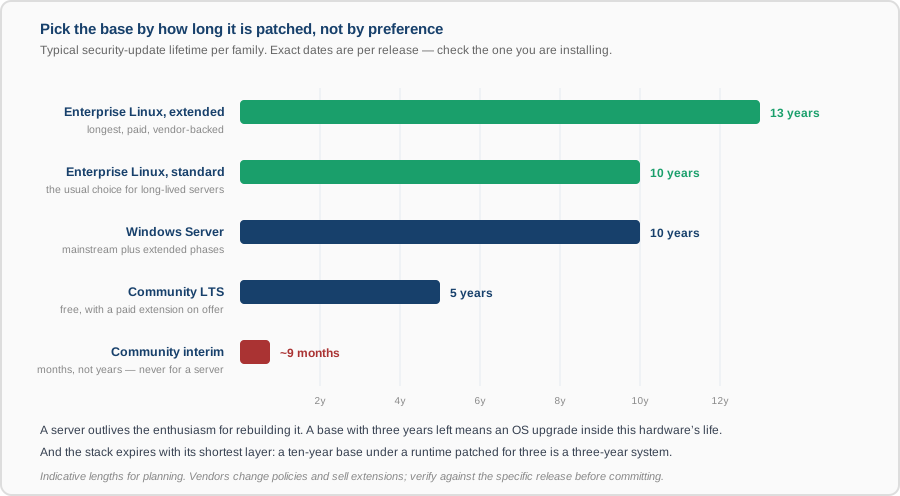
A server outlives the enthusiasm for rebuilding it. Installing a base with three years of updates left means an operating system upgrade project inside the life of the hardware, and that project will arrive at an inconvenient moment. The practical guidance:
- Long-term-support releases only for servers. Interim community releases are patched for months and are a fine desktop choice and a poor server one.
- Match the support window to the planned life. Five-year hardware under a five-year base is coherent; five-year hardware under a two-year base is not.
- Paid enterprise support buys length and a phone number. Whether that is worth it depends on whether you would otherwise be the one debugging a kernel problem at 02:00.
- Prefer what the estate already runs. Two distributions mean two sets of packages, two patch cadences and two sets of habits. Consistency is worth more than a marginal technical advantage.
- Check the vendor supports it. Commercial software is certified against specific distributions and versions, and running outside that list means you are on your own at the worst possible time.
3. The Stack Expires With Its Shortest Layer
This is the point most often missed. A ten-year operating system underneath a language runtime that is patched for three is a three-year system, because the runtime is just as exposed as the kernel. Every layer needs its own end-of-support date recorded:
- Runtime — the language version, which the application constrains and which typically has a much shorter life than the OS. Pin it deliberately; ensure the version you choose is still receiving fixes at the end of the planned life, and if it will not be, plan the upgrade now.
- Database — the single component hardest to change later, because the data has to come with it. Choose on what the application needs and on major-version support windows, and check the upgrade path exists before you need it.
- Web server or reverse proxy — usually the easiest to change and the least consequential, but it terminates TLS and faces the internet, so it needs to be current.
- Packaged or self-built. Distribution packages are patched by the distribution and lag upstream; upstream builds are current and make you responsible for tracking them. Either is defensible; mixing them without noticing is not.
4. Containers Move the Question, They Do Not Remove It
Containerising the application does not eliminate operating system choice — it produces two: the host OS and the base image inside each container. The base image needs patching on exactly the same basis, and an unpatched image is a vulnerability that ships with every deployment. What containers genuinely give you is the ability to run different runtime versions side by side on one host, which removes a real class of conflict. See containerization and Kubernetes.
5. The Criterion Nobody Writes Down
Can your team run it at three in the morning? A stack that is technically superior and unfamiliar is, in practice, slower to fix and more likely to be mis-configured. Where we recommend something new to a team, we say so explicitly and include what it takes to become competent with it — because that cost is real and is usually left out of the comparison.
What You Get
- A named stack, layer by layer, with the version of each and the reason it was chosen.
- The end-of-support date for every layer, and therefore the real expiry date of the whole system — which feeds patch management and the upgrade plan.
- The vendor-supported-configuration check, where commercial software is involved.
- An explicit note where a choice depends on skills your team does not yet have.