
Sizing
Back to Server Setup · Workload Requirements · RAID Calculator · Service Offerings
Sizing is where demand becomes a specification: CPU, RAM, storage type and network throughput matched to actual workload demands — not over-provisioned “just in case,” and not undersized either. It takes its input from workload requirements, which established what the work is and how much of it arrives; this page turns that into components.
The discipline is simple to state and easy to skip: size the constraining resource properly and buy the minimum viable amount of everything else. Money spent on the non-constraining resource buys nothing at all, and that is where most over-provisioning goes.
1. Processor: Cores or Clock, Not Both
- Fewer, faster cores for anything that runs single-threaded. A great deal of application logic, and much of a classic database's per-query work, is one thread — and no number of cores makes one thread faster.
- More, slower cores for parallel work: many concurrent requests, batch processing, containers packed onto one host.
- Check the base clock, not the boost. Boost applies to a few cores briefly. A server under sustained load runs near base.
- Sockets matter beyond the core count. A two-socket machine has memory attached to each processor, and a process reaching across to the other socket's memory is measurably slower. For a single large workload, one socket with enough cores usually beats two sockets with the same total.
- Architecture is a real choice now. ARM server parts are often cheaper per unit of throughput; the question is whether every dependency in your stack has builds for it. Worth checking rather than assuming, in both directions.
2. Memory: Does the Working Set Fit?
Memory sizing has a cliff rather than a slope, which makes it the easiest dimension to get badly wrong. If the working set fits, the system runs at memory speed. If it does not, it runs at storage speed — orders of magnitude slower, and no amount of CPU compensates.
- Size for working set plus the filesystem cache plus headroom, not for the application's resident size at idle.
- For a database, the useful question is what fraction of the hot data can be held in memory. Going from 60% to 95% cached can transform performance; going from 95% to 99% often does very little. The curve is not linear, so measure rather than extrapolate.
- ECC memory on anything that matters. Without it, a bit flip is silent data corruption that surfaces later as an unexplained bug.
- Leave room for one more of whatever you are running. Memory is the resource most often exhausted by something ordinary, and the failure — the kernel killing a process — is abrupt.
3. Storage: Two Different Requirements
The distinction that decides the purchase is IOPS against throughput. Many small random operations — a transactional database — need IOPS and low latency. Few large sequential reads — backups, media, analytics scans — need megabytes per second. A device excellent at one can be ordinary at the other.
- NVMe for random-access workloads: the lowest latency and the highest IOPS, and the default for a database unless cost rules it out.
- SATA/SAS SSD where capacity per euro matters more than the last measure of latency — still vastly better than spinning disk at random access.
- Spinning disk remains genuinely good value for sequential bulk: archives, backup targets, large media. Poor at random access, and no RAID level fixes that.
- Check endurance, not just size. SSDs are rated for a quantity of writes. A write-heavy database on consumer-grade drives is a scheduled failure.
- Separate the write-ahead log or journal onto its own device where the workload justifies it. It is small, it is write-heavy, and it is often the actual bottleneck.
What RAID costs you
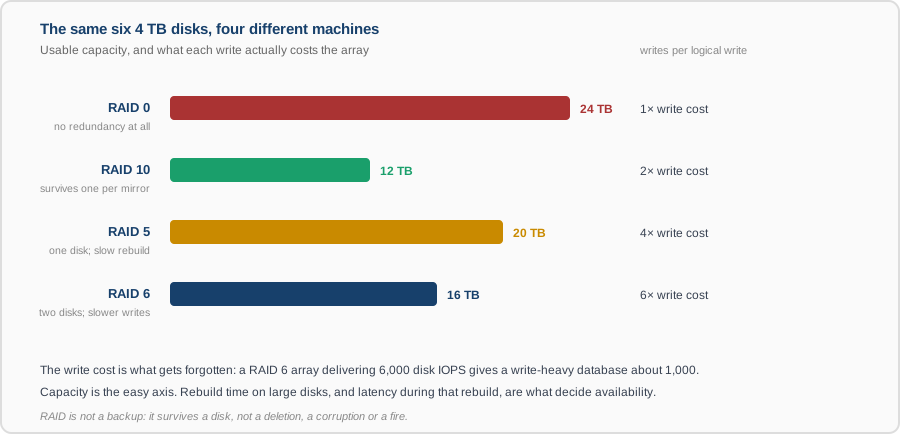
Capacity is the axis everyone compares. The one that decides whether the array is fast enough is the write cost: each logical write becomes several physical operations, so a RAID 6 array's write IOPS are a fraction of the sum of its disks. For a write-heavy database that gap is the difference between fitting and not. Rebuild behaviour matters too — on large disks a rebuild takes many hours, the array is degraded throughout, and latency suffers the whole time. Our RAID calculator works out capacity, fault tolerance and write cost for a given set of disks.
And the standing caveat: RAID is not a backup. It survives a disk failing. It does not survive a deletion, a corruption, ransomware or a fire — see backup and recovery.
4. Network: Bandwidth, Packets and Latency
- Size the link against peak throughput including backups and replication, which are frequently larger than production traffic and run at fixed times.
- Packets per second is a separate limit from bandwidth. Many small requests can saturate a NIC's packet rate while the link looks nearly idle in megabits.
- Latency is a property of distance and hops, not of bandwidth. A faster link does not make a chatty application quicker — only fewer round trips do.
- Two interfaces where the service must survive a switch or cable failing; this belongs with availability rather than with throughput.
5. Not Too Much, Not Too Little
Both directions are expensive. Undersized means queueing, and the penalty is not proportional — at 90% utilisation responses are roughly ten times slower than the work itself, as set out under workload requirements. Oversized means capital or monthly spend that buys nothing, per-core licences you did not need — see the licensing check — and, on owned hardware, a machine that idles inefficiently.
The workable rule: peak load lands comfortably left of the utilisation bend, the constraining resource has the headroom that growth projections call for, and everything else is sized to be adequate rather than generous. Where the platform allows resizing, prefer starting smaller and growing on evidence — provided something is watching to produce the evidence.
What You Get
- A specification per machine with a reason attached to each component, not a copied template.
- The constraining resource named, and the headroom on it stated as a multiple of today's peak.
- Storage sized on IOPS or throughput as appropriate, with the RAID level and its write cost accounted for.
- What the specification does not cover, so the limits are known before they are reached.